Introduction: Why Businesses Are Using AI Agents for Social Media
Social media has become an important part of business growth. Companies use platforms such as Instagram, Facebook, LinkedIn and TikTok to build brand awareness, connect with customers, promote services and generate leads. However, managing multiple social media accounts requires regular content creation, research, scheduling, engagement and performance analysis.
This is where an AI agent for social media can help. Instead of using AI only to write captions, a properly configured AI agent can follow instructions, use connected tools, perform multiple tasks, retrieve information and coordinate social media workflows.
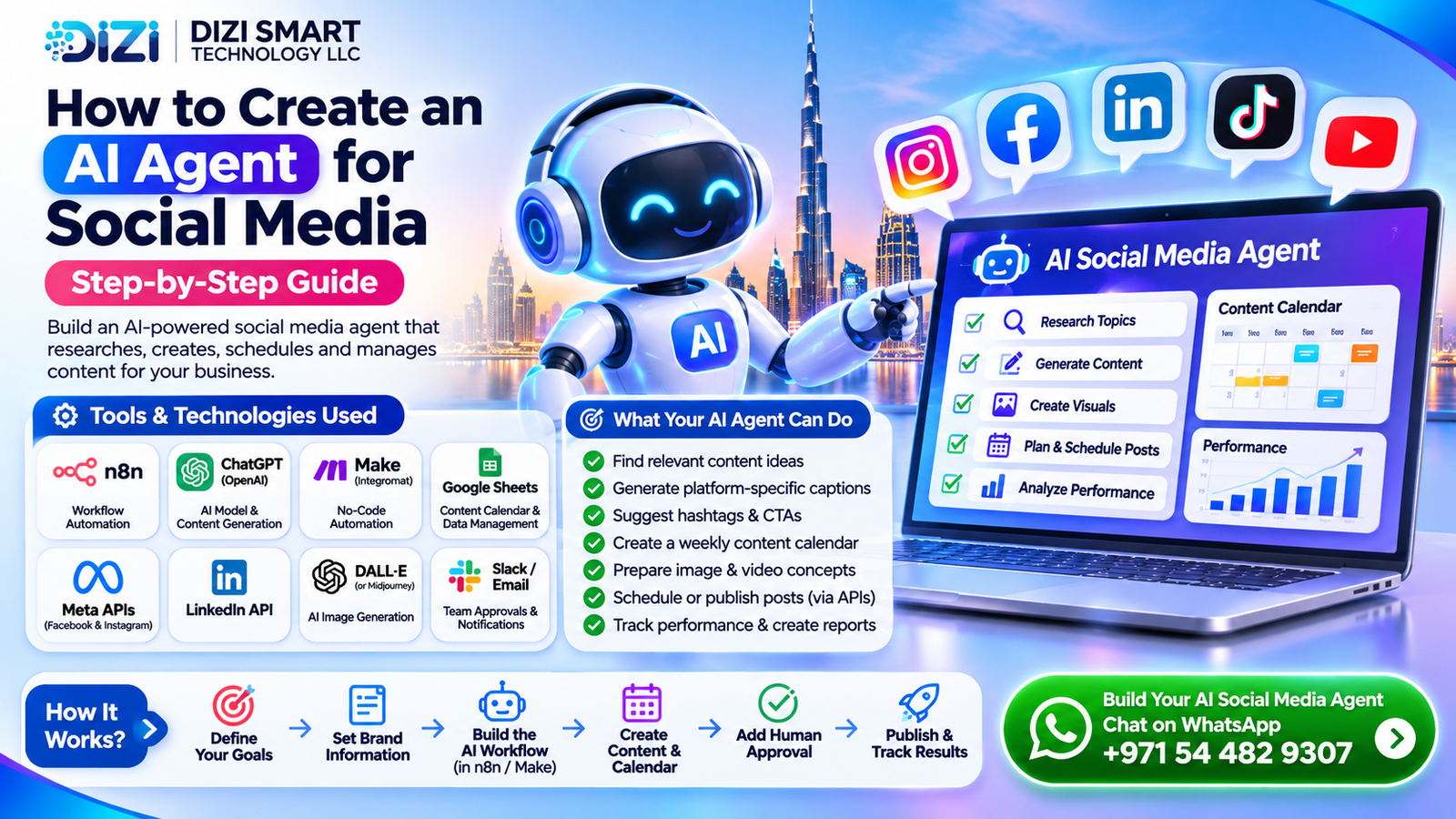
For example, you can create an AI agent that researches content ideas, prepares a weekly content calendar, writes platform-specific captions, suggests hashtags, generates image briefs and sends drafts to your marketing team for approval.
In this guide, Dizi Smart Technology LLC explains how to create an AI agent for social media, which tools you need, how to connect your accounts and how businesses can use AI automation to improve their marketing operations.
Want to Automate Your Social Media Marketing?
Looking to build an AI agent for content creation, social media management or lead generation?
Talk to our team about your AI automation project.
1. What Is an AI Agent for Social Media?
An AI agent for social media is a software system that uses an AI model, instructions, connected tools and workflows to complete defined social media tasks. Depending on its configuration, it can understand a request, decide which tools to use, perform actions and return the result.
A normal AI writing assistant may generate a caption when you ask for one. An AI agent can be configured to do more:
- Research relevant topics and content ideas.
- Prepare a weekly or monthly content calendar.
- Generate captions for different social media platforms.
- Suggest relevant hashtags and calls to action.
- Prepare image and video creative briefs.
- Send content drafts to a team member for approval.
- Schedule or publish approved posts through supported integrations.
- Collect performance data and prepare reports.
Important: An AI agent does not automatically have permission to access or publish on your social media accounts. You must configure the required integrations, credentials, permissions and approval rules.
2. How Does a Social Media AI Agent Work?
A social media AI agent generally combines five components:
1. AI Model
The AI model understands instructions, researches or processes information, and generates content. You can use a suitable model through a supported AI platform or API.
2. Instructions and Brand Knowledge
The agent needs information about your business, services, target audience, brand voice, preferred language, content themes and marketing objectives. This helps it create content that is consistent with your brand.
3. Tools and Integrations
Tools allow the agent to perform tasks outside the AI model, such as accessing approved data sources, saving content to Google Sheets, sending notifications or interacting with supported social media APIs.
4. Workflow Automation
An automation platform connects the different steps. For example, a scheduled trigger can start the workflow every Monday, ask the AI agent to create content ideas and send the results for review.
5. Memory and Performance Tracking
Where appropriate, the system can store brand guidelines, approved content, campaign information and previous performance data. This helps the workflow use relevant business context in future tasks.
3. Best Tools to Create an AI Agent for Social Media
You do not necessarily need to develop every component from scratch. You can combine AI models, workflow automation platforms and official social media integrations.
1. n8n – Workflow Automation
n8n is a workflow automation platform that can connect AI models with applications, APIs, databases and scheduled triggers. Its AI Agent functionality can use connected tools to complete multi-step tasks.
It is useful for building workflows such as content research, caption generation, approval notifications and social media reporting.
2. OpenAI – AI Model and Agent Capabilities
OpenAI's agent documentation explains how developers can build systems that use models, tools and instructions to complete tasks. A suitable AI model can help generate captions, classify comments, summarize reports and prepare content ideas.
3. Make – No-Code Automation
Make provides visual automation scenarios that connect different applications. It can be useful for businesses that want to connect forms, spreadsheets, notifications and marketing applications.
4. Google Sheets – Content Calendar
Google Sheets can store content topics, captions, platform names, publishing dates, approval status and post links. It is a practical starting point for managing an AI-assisted content calendar.
5. Meta and LinkedIn APIs – Social Media Integrations
Official platform APIs can enable approved applications to perform supported actions. For example, the Instagram Platform documentation explains the available Instagram integrations, while the LinkedIn Posts API documentation describes supported post creation and retrieval capabilities.
API access, account type, permissions, app review and platform restrictions can affect which publishing and management features are available.
4. Step-by-Step: How to Create an AI Agent for Social Media
Step 1: Define Your AI Agent's Purpose
Start by deciding exactly what you want the agent to do. Avoid giving it too many responsibilities at the beginning. Build one reliable workflow first and expand it later.
For example, your first agent could have this objective:
Create a weekly social media content plan for a digital marketing agency. Research relevant topics, prepare platform-specific captions, suggest hashtags and save all drafts in Google Sheets for human approval.
Once this workflow works correctly, you can add image generation, scheduling, reporting and other capabilities.
Step 2: Prepare Your Brand Information
Give the AI agent a clear understanding of your business. Prepare a document containing:
- Company name and website.
- Business description and services.
- Target customer profiles.
- Target locations and industries.
- Brand tone and writing style.
- Preferred languages.
- Contact details and approved calls to action.
- Topics to avoid and advertising restrictions.
For example, a Dubai-based digital marketing agency may target real estate companies, restaurants, retail businesses, clinics and professional service providers across the UAE.
Step 3: Choose Your AI Model
Connect a suitable AI model through your selected platform or API. The model should be able to understand instructions and generate the content formats required by your workflow.
Keep API credentials secure. Store keys in the platform's credential manager or secure environment variables rather than placing them directly in public documents or workflow messages.
Step 4: Create Your Workflow in n8n
For a beginner-friendly implementation, you can use n8n to connect the different components.
- Create an n8n account or configure a self-hosted instance.
- Create a new workflow.
- Add a Schedule Trigger or another suitable starting trigger.
- Add an AI Agent node.
- Connect your selected chat model.
- Provide the agent with your brand instructions.
- Add the tools it needs, such as Google Sheets or an approved research tool.
- Connect the output to a review or notification step.
- Test the workflow using sample topics before activating it.
Read the official n8n documentation for setup and configuration guidance.
Step 5: Give the Agent Clear Instructions
The instructions determine how the AI agent behaves. A useful starting prompt is:
You are a professional social media marketing assistant for a digital marketing agency. Create original, useful and engaging content based on the supplied brand information. Research current topics when a research tool is available. Prepare separate captions for Instagram, Facebook and LinkedIn. Include a suitable call to action and relevant hashtags. Do not invent statistics, customer testimonials, offers or company achievements. Save every draft with its platform, topic and suggested publishing date. Never publish content without human approval.
Customize this prompt for your industry, target market and business objectives.
Step 6: Connect Your Content Calendar
Create a Google Sheet with columns such as:
- Content ID
- Topic
- Social media platform
- Caption
- Hashtags
- Creative brief or image link
- Suggested publishing date
- Approval status
- Published post URL
The AI agent can prepare draft records, while your marketing team reviews and updates their status.
Step 7: Add Human Approval Before Publishing
This is one of the most important parts of a professional social media AI workflow. Before a post goes live, a person should review the caption, image, claims, links, spelling, brand consistency and platform suitability.
You can send the draft to an email, team chat or approval dashboard. Once approved, the workflow can proceed to the publishing integration if the relevant platform permissions allow it.
Step 8: Connect Social Media Publishing
Use supported official APIs or authorized publishing integrations. Configure the necessary account permissions and test the integration before using it for live posts.
Do not assume every platform supports the same publishing actions. Instagram, Facebook, LinkedIn and other platforms have different API requirements and restrictions. Some actions may require specific account types, app permissions or platform approval.
Step 9: Track Results and Improve the Agent
Monitor useful metrics such as reach, impressions, engagement, clicks, enquiries and qualified leads. Feed relevant performance information into your reporting workflow so the team can identify which topics and content formats are working.
Use the results to improve future content plans. Do not judge success only by the number of posts published.
5. Example: A Complete AI Social Media Workflow
Here is an example of how a weekly content automation system could work for a business:
- Monday – Research: The agent identifies relevant topics and prepares content ideas.
- Tuesday – Content creation: It generates captions for Instagram, Facebook and LinkedIn.
- Wednesday – Creative preparation: It prepares image briefs and suggests suitable visual formats.
- Thursday – Approval: The marketing team reviews and approves the drafts.
- Friday – Publishing: Approved content is scheduled or published through authorized integrations.
- Following week – Reporting: The workflow collects available performance data and prepares a summary.
This process can reduce repetitive work and give your team more time to focus on strategy, customer relationships and campaign optimization.
6. What Tasks Can a Social Media AI Agent Automate?
| Task | How AI Can Help |
|---|---|
| Content research | Suggest relevant topics and content ideas. |
| Caption writing | Generate platform-specific caption drafts. |
| Hashtag research | Suggest relevant hashtags for review. |
| Content calendar | Prepare a weekly or monthly publishing plan. |
| Creative briefs | Suggest image, carousel and video concepts. |
| Comment classification | Identify common questions, feedback and potential leads. |
| Lead routing | Send suitable enquiries to the sales team. |
| Performance reporting | Summarize available engagement and campaign metrics. |
Automation should be designed around tasks that can be safely and reliably performed. Sensitive customer conversations, complaints, financial claims and unusual requests should be escalated to a human team member.
7. How AI Agents Help Businesses Grow
Save Time on Repetitive Tasks
AI can assist with content research, caption drafts and reporting, reducing the time spent on repetitive marketing activities.
Maintain Consistent Content
A structured content workflow helps businesses plan posts regularly instead of creating content only when someone has free time.
Support Multiple Platforms
One approved content idea can be adapted into different formats for Instagram, Facebook, LinkedIn and other channels, while respecting each platform's audience and format.
Improve Lead Management
An AI-supported workflow can classify incoming enquiries, collect relevant information and route potential customers to the right team. It can also connect with CRM systems where suitable integrations are available.
Make Better Marketing Decisions
Performance summaries can help marketing teams understand which topics attract attention, which campaigns generate enquiries and where improvements may be needed.
8. Common Mistakes to Avoid When Building an AI Agent
- Unclear instructions: Vague prompts often produce inconsistent results.
- No brand guidelines: The agent may create content that does not match your company's identity.
- Publishing without review: Incorrect information or unsuitable content can damage brand trust.
- Ignoring platform rules: Use official APIs and follow the relevant platform's terms and permissions.
- Exposing API keys: Keep credentials secure and restrict access.
- Automating everything at once: Start with a small workflow, test it and expand gradually.
- Measuring only engagement: Track business outcomes such as enquiries and qualified leads as well.
9. How Much Does It Cost to Create a Social Media AI Agent?
The cost depends on the complexity of the agent, number of social media platforms, AI model usage, automation platform, API integrations, hosting and ongoing maintenance.
For planning purposes, consider these cost categories:
- AI model usage: Depends on the selected provider, model and volume of requests.
- Automation platform: Depends on whether you use a free, paid or self-hosted solution.
- Integration development: Depends on the number and complexity of connected services.
- Hosting and database: May be required for custom or self-hosted systems.
- Maintenance: Includes monitoring, updates, troubleshooting and workflow improvements.
There is no single fixed price for every business. A simple content-drafting workflow is very different from a multi-platform system with custom dashboards, CRM integration, lead routing and analytics.
Before selecting a solution, define your requirements and request a project-specific estimate.
Build Your Social Media AI Agent with Dizi Smart Technology LLC
Want to automate content creation, social media workflows and lead management for your business?
Tell us about your business, the platforms you use and the tasks you want to automate. Our team can discuss a suitable AI automation solution.
Email: info@dizismarttechnology.ae
10. Why Choose Dizi Smart Technology LLC?
Dizi Smart Technology LLC is a Dubai-based digital solutions and technology company offering website development, digital marketing and technology services. We help businesses explore practical ways to improve their online presence and marketing operations.
Our services include:
- AI-powered business automation planning.
- Custom website and web application development.
- Social media marketing solutions.
- SEO and local SEO services.
- Google Ads and Meta Ads management.
- Business workflow and system integration.
Every business has different requirements. We focus on understanding the business process first and then identifying suitable technology and automation options.
Explore our official website, learn about our website development services, view our website portfolio or contact our team.
Frequently Asked Questions (FAQs)
1. What is an AI agent for social media?
It is an AI-powered system that uses instructions, tools and integrations to assist with social media tasks such as research, content creation, scheduling and reporting.
2. Can I create a social media AI agent without coding?
Yes. Platforms such as n8n and Make provide visual workflow tools. Some integrations and advanced customizations may still require technical configuration.
3. Which is the best platform to build a social media AI agent?
The right platform depends on your needs. n8n is useful for flexible workflow automation, while Make offers visual automation scenarios. Custom development may be suitable for more complex requirements.
4. Can an AI agent automatically create Instagram posts?
It can prepare captions and creative briefs. Publishing requires a supported integration, eligible account, appropriate permissions and compliance with Instagram's platform requirements.
5. Can AI agents manage Facebook and LinkedIn?
They can assist with content preparation, workflows and supported account actions. Available publishing and management capabilities depend on each platform's API access and permissions.
6. Can an AI agent reply to social media comments?
It can help classify comments and draft responses. Automated replies should only be enabled where supported and should include safeguards for sensitive or complex conversations.
7. Can an AI agent generate social media images?
Yes. You can connect a compatible image-generation tool to prepare creative assets. A human should review brand consistency, accuracy and image rights before publication.
8. How much does a social media AI agent cost?
Costs depend on AI usage, integrations, workflow complexity, hosting and maintenance. A simple content assistant will generally require less work than a custom multi-platform automation system.
9. Is n8n suitable for social media automation?
Yes. n8n can connect AI models, triggers, APIs and other applications to build social media workflows. The available actions depend on the integrations and permissions configured.
10. Can an AI agent generate leads from social media?
It can help identify and organize enquiries, collect lead information and route prospects to a sales team. Lead generation also depends on the quality of your content, audience, offers and marketing strategy.
11. Does an AI agent replace a social media manager?
No. It can reduce repetitive work, but human strategy, creative direction, relationship management and quality control remain important.
12. How long does it take to build an AI agent?
A basic workflow may be built relatively quickly, while a custom production system with multiple integrations, permissions, testing and reporting requires more development time.
Conclusion
Creating an AI agent for social media can help businesses organize content production, reduce repetitive work and improve marketing workflows. The best approach is to start with a clear objective, provide accurate brand information, connect the necessary tools and introduce human approval before important actions.
Whether you want a simple AI content assistant or a custom social media automation system, choosing the right architecture and integrations is essential.
Ready to explore AI automation for your business? Contact Dizi Smart Technology LLC and discuss your requirements with our team.
Website: https://dizismarttechnology.ae/
Email: info@dizismarttechnology.ae
WhatsApp: +971 54 482 9307