As artificial intelligence continues to change how people discover companies, products and services, businesses are looking for new ways to become visible across AI-powered platforms. ChatGPT is becoming an important platform where people can research companies, compare services and explore business solutions.
OpenAI has introduced Businesses in ChatGPT and Business Hub, allowing eligible business owners and authorized representatives to claim their business, manage business information and understand how customers engage with their business in ChatGPT.
In this detailed guide, Dizi Smart Technology LLC explains how to submit and claim your company website through ChatGPT Business Hub, how business verification works, what information you may need and how to improve your company's online presence for AI-driven discovery.
Need Help With ChatGPT Business Hub Registration?
Want professional assistance with website development, technical SEO, AI search visibility or your digital business presence? Talk to our team.
WhatsApp: +971 54 482 9307
Website: https://dizismarttechnology.ae/
What Is ChatGPT Business Hub?
ChatGPT Business Hub is an OpenAI platform that allows eligible business owners and authorized company representatives to claim and manage their business listings in ChatGPT.
After a business claim is approved, the business can access its profile through Business Hub. Following the required identity verification, businesses can update information and access available features such as business insights and product feed connections.
Depending on eligibility, businesses may be able to:
- Claim an existing business listing or add an eligible business.
- Manage important business information.
- Update the company website and business description.
- Provide accurate product and service information.
- View aggregated business mentions and website click insights.
- Connect an eligible product feed.
Official resource: Businesses in ChatGPT – OpenAI.
Why Should Your Business Join ChatGPT Business Hub?
Customers increasingly use AI tools to research companies, compare solutions and discover service providers. Having accurate business information available to ChatGPT can help customers understand what your company offers.
1. Improve Business Information Accuracy
Claiming your eligible business listing gives you a way to manage important company details and help keep the information current.
2. Strengthen Your AI Search Presence
Clear website content, accurate company information and consistent business details can help AI systems understand your company. However, claiming a profile does not guarantee that ChatGPT will recommend your business or rank it above competitors.
3. Understand Customer Interest
Business Hub provides aggregated insights, including available business mentions and website clicks. These insights can help eligible businesses understand how people discover and engage with them.
4. Keep Your Products and Services Updated
Eligible retailers can connect product feeds containing information such as product details, prices and availability. This helps provide more current information about their offerings.
Requirements Before Submitting Your Website
Before starting the registration process, prepare the following information:
- Official company website: Your active business website.
- Business name: Your registered or publicly used company name.
- Business email: An email address associated with your company domain, if available.
- Business phone number: A working number if phone verification is offered.
- Company registration details: Business registration documents may be requested.
- Website domain access: Access to your domain DNS settings if you choose TXT verification.
- Authorized representative: The person submitting the claim must own the company or have permission to represent it.
Verification options and requirements may vary depending on the business, location and eligibility checks. OpenAI may request additional evidence of identity or authority.
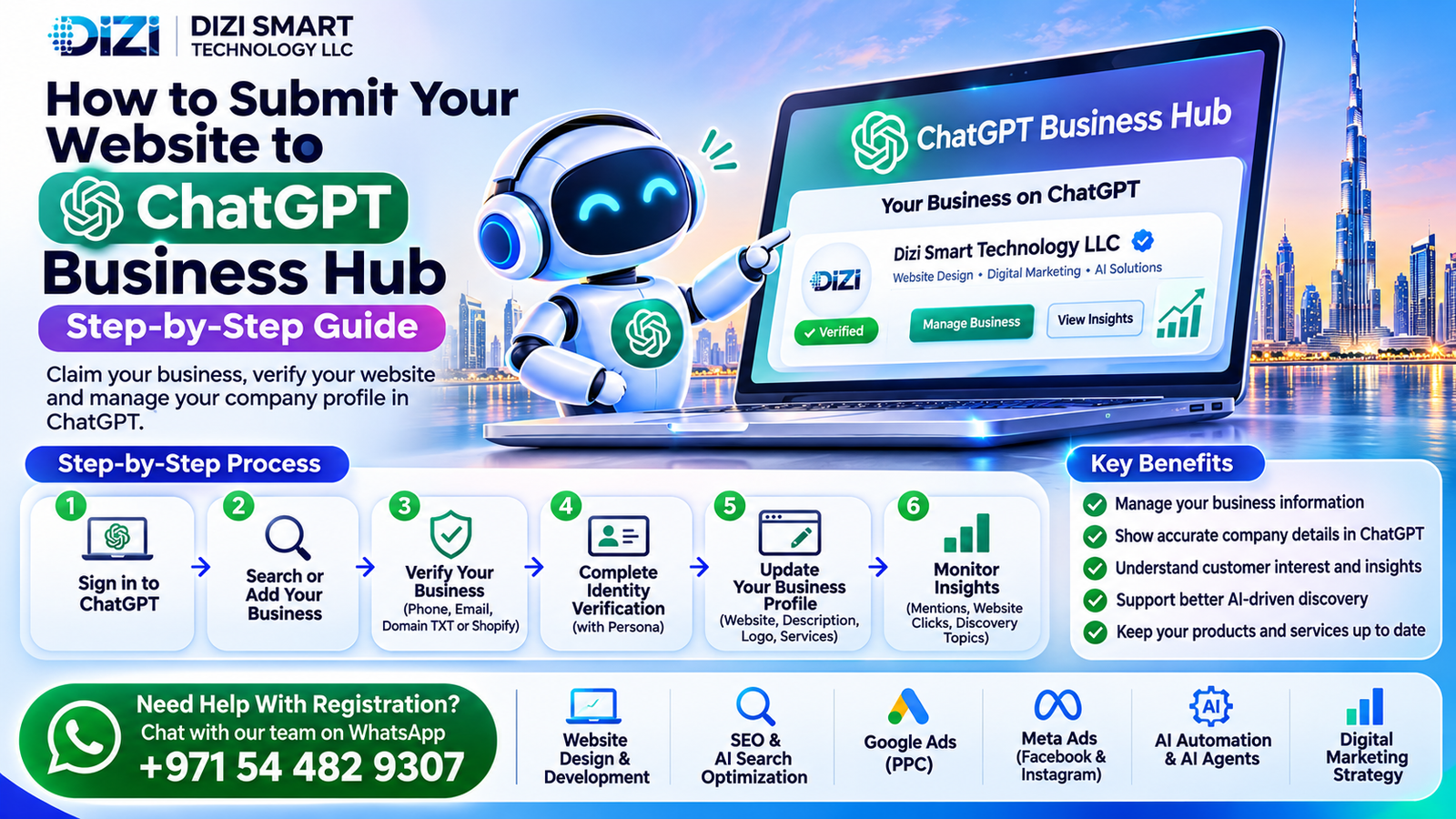
Step-by-Step: How to Submit Your Website to ChatGPT Business Hub
Step 1: Open ChatGPT Business Hub
First, visit the official ChatGPT Business Hub page:
https://chatgpt.com/business-hub
Sign in using your ChatGPT account. If Business Hub is available to your account, open it and look for the option to claim your business.
Step 2: Search for Your Company
Search for your company using its official business name. Check the available listing carefully before selecting it.
Make sure that the company name and website correspond to your actual business. If the correct listing is available, select it and follow the instructions to claim the business.
If you cannot find your company, check whether Business Hub offers an option to add an eligible business. Availability can depend on business type and location.
Step 3: Confirm Your Authority to Manage the Business
Choose the ChatGPT account you want to use to manage the business listing. You must be the business owner or an authorized representative.
Follow the instructions shown on the screen. OpenAI may ask you to confirm your relationship with the company and complete additional verification.
Step 4: Select a Business Verification Method
Business Hub may offer one or more verification methods, depending on your listing and eligibility.
Possible methods include:
- Business phone verification: Receive a verification code through SMS or an automated phone call, if offered.
- Business email verification: Receive a code at an eligible company email address, if offered.
- Website domain verification: Add a TXT record to your domain DNS settings.
- Shopify verification: Eligible Shopify merchants may be able to connect their store.
Select the method available in your account. Do not assume that every business will receive every verification option.
Step 5: Verify Your Website Domain Using a TXT Record
If you select website domain verification, ChatGPT may provide a TXT record that you need to add to your domain's DNS settings.
Follow these steps:
- Open the domain verification section in ChatGPT Business Hub.
- Select the website domain verification option.
- Copy the TXT record value provided by OpenAI.
- Log in to your domain registrar or DNS hosting provider.
- Open the DNS management section for your domain.
- Add a new TXT record.
- Enter the host or name and TXT value exactly as provided.
- Save the DNS record.
- Return to ChatGPT Business Hub and follow the verification instructions.
Important: Do not copy a sample TXT record from another website or use a verification value generated for another company. Always use the exact record shown in your own ChatGPT Business Hub account.
DNS changes can take time to become visible. If verification does not work immediately, check the record for typing errors and allow time for DNS propagation.
Step 6: Complete Identity Verification With Persona
After your business claim is approved, OpenAI may require identity verification through Persona before you can publish changes to your business information or access certain Business Hub features.
Depending on the verification request, you may need:
- A valid government-issued identity document.
- Business registration information.
- Evidence that you are authorized to represent the company.
- Additional identity verification information requested during the process.
Follow the official Persona instructions carefully and submit only the information requested through the official verification process.
Step 7: Wait for Verification Approval
After submitting the required information, wait for OpenAI to review your claim and identity verification.
OpenAI may email you with an approval, a request for additional information or a decision about your submission.
Once the relevant approval is complete, access your business profile through Business Hub and review the available management features.
Step 8: Update Your Business Information
After the required verification, review your business profile and update the information available to you.
Make sure your details are accurate and consistent with your official website and company information.
Recommended business information includes:
- Official business name.
- Company website URL.
- Business description.
- Business category.
- Company logo.
- Business contact information.
- Products and services.
- Relevant policies and other requested business details.
OpenAI reviews and publishes certain changes. Updates may take time to appear, and ChatGPT may continue using other information sources when answering questions about your business.
Can a UAE Company Register on ChatGPT Business Hub?
OpenAI's Business Hub information states that eligible businesses in locations where ChatGPT is available can claim their business. Availability depends on business type, location, verification support and other eligibility checks.
For example, a UAE-based company such as Dizi Smart Technology LLC can check its eligibility by signing in to Business Hub and following the claim process available for its business.
It is important to understand that claiming a business listing is different from accessing a Business Agent. Business Agents currently have separate eligibility requirements and are available to eligible ecommerce and online service businesses in the United States, with availability subject to OpenAI's policies and expansion.
Therefore, a UAE business should not assume that claiming its listing automatically provides access to a Business Agent.
How to Prepare Your Website for Better AI Visibility
Submitting or claiming your company in Business Hub is only one part of improving your digital presence. Your website should also clearly explain your company, services and expertise.
1. Create Clear Business Information Pages
Include useful pages such as About Us, Services, Contact Us and company information. Make sure your business name and contact details are consistent throughout your website.
2. Publish Helpful and Informative Articles
Write original articles that answer the questions your potential customers actually ask. Explain your services, processes, benefits, pricing factors and frequently asked questions.
3. Use Structured Data Where Appropriate
Implement relevant structured data, such as Organization, LocalBusiness, Service and Article schema where appropriate. Ensure that the structured data accurately reflects visible website content.
4. Improve Website Technical SEO
Make sure your website is accessible, mobile-friendly, secure and easy to navigate. Maintain a valid sitemap and fix broken links and important crawling issues.
5. Publish Consistent Business Information
Keep your company name, website, address, phone number and service descriptions consistent across your website and legitimate business profiles.
6. Review AI Crawler Access
Review your website's robots.txt file and server settings to understand which crawlers are allowed to access your pages. OpenAI documents its crawlers and their purposes in its official documentation.
Read: OpenAI Crawlers and User Agents Documentation.
Common Problems During ChatGPT Business Verification
Business Listing Not Found
Check the company name and website carefully. If your business is eligible, look for an option to add a business. Some business types and locations may have different listing rules.
TXT Record Verification Failed
Check that the TXT record was copied correctly and added to the correct domain. Avoid creating duplicate or incorrect verification records.
Business Email Verification Not Available
Verification methods depend on your listing and eligibility. Use another verification option if Business Hub offers one.
Identity Verification Is Pending
Wait for the review and check your registered email for updates or requests for additional information. Submit genuine and consistent business documents.
Business Listing Is Locked
If Business Hub displays a support option for a locked listing, follow that route to request assistance. Do not attempt to claim the same business repeatedly using unrelated accounts.
How Dizi Smart Technology LLC Can Help Your Business
Dizi Smart Technology LLC is a Dubai-based digital solutions and technology company helping businesses strengthen their online presence through website development, search engine optimization, digital advertising and technology solutions.
Our services include:
- Professional website design and development.
- Technical SEO and website optimization.
- Local SEO and business visibility strategies.
- Google Ads and PPC campaign management.
- Meta Ads and social media marketing.
- AI automation and AI agent development.
- Website analytics and conversion tracking.
- Digital strategy and online brand development.
We can help businesses prepare their websites and digital information for better discoverability, improve their technical SEO and understand the steps involved in AI business visibility. Business Hub approval, profile placement and AI recommendations remain subject to OpenAI's independent eligibility and review processes.
Explore our services:
- Website Design and Development Services
- Website Development Portfolio
- Contact Dizi Smart Technology LLC
Want to Improve Your Business's AI Search Visibility?
Speak with Dizi Smart Technology LLC about website optimization, technical SEO and AI-focused digital strategies.
WhatsApp: +971 54 482 9307
Contact Us on WhatsAppOfficial OpenAI Resources and External Links
For the latest information, always refer to OpenAI's official resources:
- Businesses in ChatGPT – Official OpenAI Overview
- Open ChatGPT Business Hub
- OpenAI Help Center – Setting Up Your Business on ChatGPT
- Businesses in ChatGPT Terms
- OpenAI Crawler Documentation
Frequently Asked Questions About ChatGPT Business Hub
1. What is ChatGPT Business Hub?
ChatGPT Business Hub is a platform where eligible business owners and authorized representatives can claim and manage their business listings in ChatGPT.
2. Is ChatGPT Business Hub free?
Business claiming is not described as requiring a ChatGPT Enterprise agreement or an Ads account. Check the official Business Hub process for any applicable requirements or services.
3. Can I submit my UAE company to ChatGPT Business Hub?
Eligible businesses in supported ChatGPT locations can claim their business. A UAE company should check the availability and verification options presented in its own Business Hub account.
4. Do I need a website to claim my business?
OpenAI's business information describes website-based claiming for eligible businesses. The exact requirements and options depend on the business type and eligibility.
5. How can I verify my website domain?
If offered, select website domain verification in Business Hub and add the exact TXT record supplied by OpenAI to your domain DNS settings.
6. What is Persona verification?
Persona is the identity verification provider used in the Business Hub process. OpenAI may require identity and business-authority checks before certain management features become available.
7. How long does business verification take?
Processing time can vary. Check your Business Hub status and registered email for updates or requests for additional information.
8. Will my company automatically appear at the top of ChatGPT recommendations?
No. Claiming a business does not guarantee higher placement, recommendations or sales. ChatGPT continues to make independent recommendations.
9. Can I create a Business Agent after claiming my company?
Not necessarily. Business Agents have separate eligibility requirements. They are currently available to eligible ecommerce and online service businesses in the United States, subject to OpenAI's policies.
10. Can I update my company details after approval?
After the required verification, you can update the business information available in your Business Hub account. OpenAI may review and publish changes.
11. Do I need Google Ads to register on ChatGPT Business Hub?
No. OpenAI's Help Center states that you do not need an Ads account or a ChatGPT Enterprise agreement to claim an eligible business.
12. How can I improve my company's AI visibility?
Publish useful website content, maintain accurate business information, improve technical SEO, use appropriate structured data and make your website accessible to relevant crawlers.
Related Articles From Dizi Smart Technology LLC
Continue learning about AI, digital marketing and business growth with these related articles:
How to Create an AI Agent for Social Media
Learn how AI agents can help businesses automate social media workflows, content creation and marketing activities.
Read the Complete Guide →What Are Meta Ads? How Facebook and Instagram Ads Help Businesses Grow
Understand how paid social advertising can help businesses reach potential customers and generate enquiries.
Read the Complete Guide →Top 10 Google Ads Agencies in Dubai
Explore Google Ads management, PPC campaign optimization and lead generation strategies for Dubai businesses.
Read the Complete Guide →Final Thoughts
ChatGPT Business Hub offers eligible companies a way to claim and manage their business information in ChatGPT. By following the correct registration and verification process, businesses can take an important step toward maintaining accurate information across AI-powered discovery experiences.
However, registration alone is not a complete digital marketing strategy. Your website, business information, useful content, technical SEO and customer experience all play important roles in building a strong online presence.
If your business needs help with website development, SEO, AI automation or digital marketing, contact Dizi Smart Technology LLC.
Grow Your Business With Dizi Smart Technology LLC
Let's strengthen your online presence with professional website development, SEO, digital marketing and AI-powered solutions.
WhatsApp: +971 54 482 9307
Chat With Our Team on WhatsApp
Email: info@dizismarttechnology.ae
Website: https://dizismarttechnology.ae/
Contact: Contact Our Team